Posts

Showing posts with the label Technology and Internet

To Format or To Troubleshoot

To format or not to format, that is the question. Over the course of the years, yours truly have been fixing countless PCs and Laptops and so far there has not been a case where yours truly cannot fix. (Of course if the hardware is broken then that is a different story). And no, this is not a post to self brag mmmkay. =p Just to express that the skills and knowledge if not updated will become obsolete and again the same old saying, "Learning continues until you are six feet under". Back to the focus of this post. To format or not to format. To troubleshoot or not to troubleshoot.  There are some so called "experts" who somehow thinks that only amateur or those who don;t know their stuff would resort to formatting PC or Laptop if there are any software related problems. These so called "experts" somehow have the mentality that the "expert" and "professional" way is to troubleshoot the software problem and find a solution to it rather...
(&^*%$&^^#^$&^%^*(&^*(%^*!!!!!!!!!

STREAMYX!!!!!!!!!!!!!!!!!!! STREAMYX!!!!!!!!!!!!!!!!!!! STREAMYX!!!!!!!!!!!!!!!!!!! STREAMYX!!!!!!!!!!!!!!!!!!! STREAMYX!!!!!!!!!!!!!!!!!!! STREAMYX!!!!!!!!!!!!!!!!!!! No, this is not advertisement for streamyx This is to voice out frustration caused by Streamyx aka Stimix  Grrrrrrr Woof

Samsung SSD Awesomeness

This is like so awesome. Serious. Watch Woot!!!!!

Win32 Conficker Removal Tools

Domain controllers not responsive? Slow network? Can't access online security websites such as McAfee and Kaspersky  ? Windows Automatic Updates disabled? If you have the above symptoms in your computer then you can start to panic now because tomorrow is 1st of April and the Win32 Conficker worm/virus is set to activate on that date. In other word, its ALIVE!!!! But fret not, the good people from Microsoft and few other anti virus companies have already come up with removal tools. Choose which of the removal tools you prefer, download and run it. If you are unsure, just download all and run all, one by one. The removal tools listed (Go and download. Its free): Microsoft Malicious Software Removal Tool   Win32.Worm.Downadup.Gen Removal Tool (Bitdefender)   Win32/Conficker.AA Removal Tool (Eset)   Win32.Downadup Removal Tool (Symantec)   For more details on the Conficker worm/virus including how to ensure you have a clean system, go to the Microsoft official website regarding the C...

Restoring Explorer.exe in Windows

Image
"Help, My taskbar is gone when I start my computer!!!!" "Why is it that I can see my mouse cursor moving and nothing else when I start my computer???" "Help, I can only see my documents folder opened when I login into my desktop" If any of the above sounds familiar to you then this post would do you some good. Honestly. I received some S.O.S email from some readers that they encountered the above problems and are at loss what to do. Since BenardCometh Revelations sole purpose is to help all mankind and non-mankind alike, yours truly decided to post a simple step by step on how to recover the missing or non showing explorer.exe. Before that, a little bit of introduction aye? The above problem will most probably happen when you are infected with viruses/trojans. Those sneaky bastards sole purpose in life is to make life miserable for anyone they came in contact with. Hence, you encountered a lot of problems and the problem mentioned above is one of the sym...

How to change Acer Aspire 5500 series keyboard

Image
Previously yours truly posted a mini tutorial on how to change or upgrade your laptop memory module aka RAM specifically in ACER Aspire 5500 series. Now I am going to show how to change the keyboard on the ACER Aspire 5500 series laptop. Please bear in mind that if you are not confident enough in tinkering with your laptop then don't do it. In other words, kids don't try this at home. Ahem. First of all. open up the panel cover of the laptop. To open the panel, you need to pull out the panel from the sides carefully. Pictures are worth a thousand words eh. The Laptop Press down the LCD panel Pull open the panel from both sides Try to pry open carefully using fingers Try another side Pull open the panel cover Panel Cover opened Now, once the panel cover is opened you will see the two screws that fasten the keyboard to the laptop. Unscrew the two screws and then pull up the keyboard carefully because there are cable connected to the motherboard underneath. Opened The Two Screw...

Installing New Fonts How To

Image
Oh well, As simple it may seems, there are still people asking me how the heck one install fonts, extra fonts that they found or downloaded from the Internet. Thus, this post comes into existence. Tadahhhhh!!!!! Why install new fonts? Simply for the fact that one can have those decorated fonts installed for their own preferences. Or maybe one found the ultimate font that outshines, outperform, and out-whatever-you-prefer the default fonts. One font to conquer em all so to speak. However, please remember to always use professional fonts for professional use. I am sure you do not want to use decorated fonts in your resume and send for job applications, do you? Anyway, back to the post. How to install new fonts in your computer/pc/laptop. Please bear in mind that this how-to is aimed for Microsoft platform since all of those who asked are using Windows. Ahem. (If you want to install fonts in other operating systems. Ask and maybe thou shall receive. =p) First of all, please go and get the...

Ditch Internet Explorer Already

Are you still using Internet Explorer as your default browser to browse the Internet? It's about time that you try other browsers such as FireFox and Chrome. I would recommend Firefox though. Heck, anything is better than Internet Explorer. Why? Well, if you have no knowledge about the many bugs and flaws that infests Internet Explorer, this is another reason why. Serious Security Flaws Found in Internet Explorer Users of Microsoft's Internet Explorer are being urged by experts to switch to a rival until a serious security flaw has been fixed. The flaw in Microsoft's Internet Explorer could allow criminals to take control of people's computers and steal their passwords, internet experts say. Microsoft says it has detected attacks against IE 7.0 but said the "underlying vulnerability" was present in all versions of the browser. Other browsers, such as Firefox, Opera, Chrome, Safari, are not vulnerable to the flaw Microsoft has identified. "...

How To Set Photoshop Scratch Disk

Image
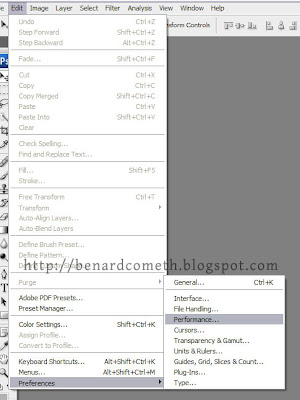
Thought this might be useful to some. Recently I am working on some large files with Photoshop that involves huge memory usage hence I decided to modify the Photoshop CS3 Scratch Disk to cater for the huge memory usage even though I upgraded my system memory to 2GB earlier on just in case. Note that, if your memory allocation is not enough, more than often Photoshop will prompt an error saying that the scratch disk is full. Some just restart their computer and restart again. It works but troublesome. Now, what is Scratch Disk? Simply put, a scratch disk is virtual memory. Photoshop uses the scratch disk/virtual memory when your system does not have enough memory/RAM to perform the operation needed. By default, the scratch disk will be on the hard disk where you installed Photoshop. You can always change the scratch disk to any hard disk partition you want or even assign a second, third, fourth and so on scratch disk to be used when the primary scratch disk is full. Always remember tha...

Get Free Domain Name

Image
Yep, you heard it right. You can get your very own free domain name but only limited to CO.CC. For example, you can get benardcometh.co.cc or benardcomethisthegreatest.co.cc if you want. The first one I have registered already so you can't have it but the second one is still open for grabs. Come on now, you know you wanted it. Now, try to go to http://www.benardcometh.co.cc and see what u get? BenardCometh Revelations of course with no charges applied. How neat is that? Totally free of charge. You can basically get yourname.co.cc for FREE. How cool is that? Now, how do you register the free domain name of your own? First of all, go to CO.CC and you will arrive at the main page with the search bar where you can enter your preferred domain name and check the availability of the domain name. CO.CC Enter your desired domain name and check for the availability. In this case, I am going to use benardcometh. Obviously. Type in desired domain name Confirmation of Domain Name availabili...

Mobile Blogging

Got my hand on an Iphone 3G to play with and so far I am liking it. In case you doesn't get the hint yet, this post is written/blogged by using an Iphone 3G. Now I know what I want for Christmas. I have been a pretty good boy and behaves well this year. Ahem***. Santa Claus surely will climb down the chimney and give me an Iphone. Wait, my house don't have a chimney. Darn, for a moment there I thought that I might just get the present from Santa. What? Santa doesn't exists? Oh the betrayal, the lies, the agony, and the pain. All these years I have been cheated. Oh cruel world, where is the love? the hope? the waiting? There you have it. A rant testing of mobile blogging using Iphone 3G. So far, I am loving it. The touch screen qwerty keyboard perform beyond my expectations. Way cool. Not bad for a phone. Almost like a real small pc. Definitely an excellent choice for those who are on the move often. Am actually waiting for the firmware and winpawn to finish downlo...

Press Any Key To Continue

Image
"May I know where the any key is located?" Seriously, is that a trick question? It's not some April Fool joke right? Wait, April Fool is over. Alright, lets see. P ress Any Key To Continue means you press any key to continue. Seriously, it is really not a trick question? Alright, giving you the benefit of a doubt. When you encountered "Press Any Key To Continue" situation, please just press the "ENTER" key. Alright? That way you are sure to proceed with whatever you are doing. "ENTER" Key And please don't ask me why the "ENTER" key is "ANY" key. I will really die I tell you. From the excessive laughter overdose. Just to play safe, or in case you can't find the "ENTER" key as your "ANY" key. Use the following "ANY" key thank you very much. The usual "ANY" key Hope that helps. BenardCometh Revelations always aim to solve your problems as efficient and as effective as...