Posts

Showing posts with the label Photoshop Tutorials

4 Excellent Photoshop Tutorials Site For Beginners
Image
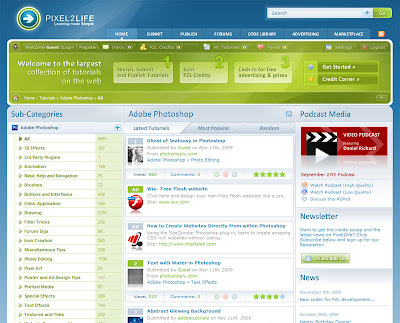
Alright, I have jumped to the dark side. Even I resort to do the number listing post. OMG, the agony, the humiliation, the shame and ***fill in the blank with related vocab***. However, this is for a good cause mmmmkay. Every now and then there are people asking yours truly on how the heck one get started on learning Photoshop and these are the types that have difficulties of even using Uncle Google to search for relevant tutorials. Yours Truly tries to help by even trying to churn out some Photoshop tutorials but then it is sort of like a failure due to lack of updates. If you must know which failure tutorials then read the Photoshop Basics Part 1 and Photoshop Basics Part 2 . Hence, it would be better to just list out some tutorial sites that contains some excellent tutorials for beginners. Extremely handy for those beginners who wants to learn the basics and gradually move to a more advance level. The basics are important mmmmkay. Thus, yours truly found 4 excellent Pho...
Photoshop Basics Tutorial Part 2- Layers

Image
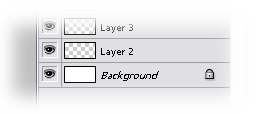
This is the continuation from the Photoshop Basics Tutorial Part 1 . This post will explain about the layer components in Photoshop and its functionalities. One can go to the extent to say that without layers, Photoshop is nothing. (Yes, layers are THAT important) Whenever you create a new file in Photoshop, you will see a layer named as Background. By default the background layer is white, and any layers created after that are transparent. If you noticed, there is a padlock icon at the right of the layer. That indicates that the layer is locked for editing. To enable it for editing, just double click on the layer to unlock. Before we continue, lets looks at the layer components. Layer Opacity: Changes the opacity of the current layer, 0-100%. 0% being transparent. Blending Mode: Blends the selected layer with layers below it. Different type of blending mode will yield different results. (more on this in future post) Layer Visibility: Indicates whether the layer is visible or not. The...

Photoshop Basics Tutorial Part 1

Image
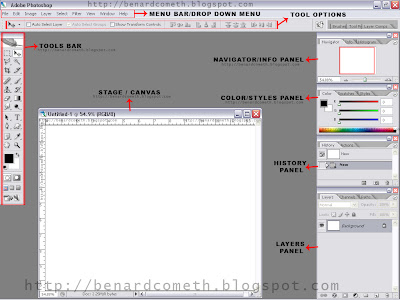
Alright, yours truly am going to do a series of Photoshop tutorials. For those who don't know, basically Adobe Photoshop is an image manipulation software. All you need to know is that Photoshop is very very useful and by knowing how to at least operate/use Photoshop will do you more good than harm. Lets begin with the basics shall we? For those who are already very expert in Photoshop please bear with me. One have to learn how to crawl before one can walk, correct? First of all, open up Photoshop. Yes, you have to install Photoshop FIRST before you can use it and yes, you have to double click on the Photoshop icon before you can run it. Unless of course if yours are operated by voice command then that would be different. (And yep, I am trying to be funny here in case you don't know. =p) So, the first thing you will see when you run Photoshop is the WORKSPACE or the Photoshop main window. Refer to the following image which is labeled for your convenience. There are a lot of di...